







Look & Feel
White-Label 3D Viewer That Matches Your Brand
Customize the viewer’s appearance to match your brand identity. Adjust colors for buttons and backgrounds, and add custom icons to create a cohesive visual experience that aligns perfectly with your website design.
Availability
Basic
Premium
Enterprise
Live demo
Key features
Everything you get
Match your brand
Style the viewer so it blends seamlessly into your website.

Custom button colours
Set the colour and appearance of every button and control.

Custom icons
Replace the default icons with your own for a unique interface.

Custom backgrounds
Adjust the background colour to fit your product presentation.
Availability
Available in your plan
Basic
Included
 Included
Premium
Included
Enterprise
Included
Gallery
See it in action
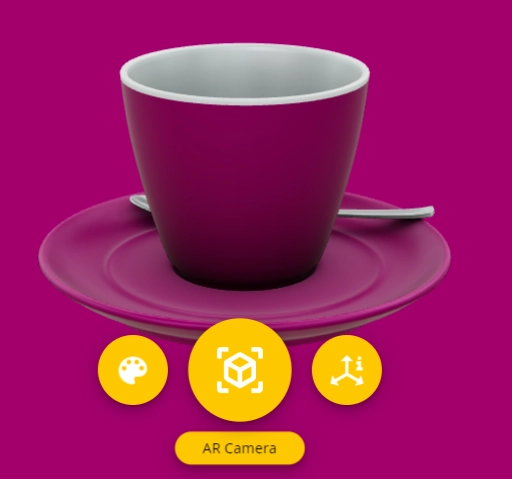

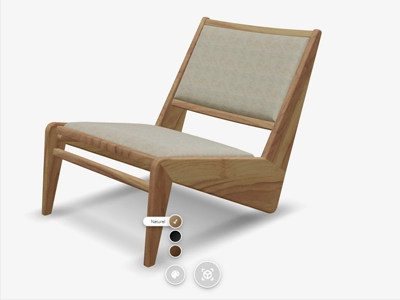
To give your product presentation a unique appearance, Vulp Studio offers a high degree of customization for our viewer. The background color, button colors and appearance, as well as the use of custom icons, can be adjusted to seamlessly match your brand identity. These customizations ensure that the user experience is not only functional but also visually appealing and recognizable for your customers. The Vulp 3D configurator is designed for everyone, even without web development knowledge - by tweaking a few parameters in the iframe, you can style menu buttons, background and icon colors to align with your corporate design. If you want a fully custom look, use our API to build your own interface.
Background color
The default background color is set in our CMS and changes to match the product. If you want a custom background, use the background-color parameter to set a static color, or set it to transparent and add an image in your own CSS styling.
Menu design
If you don’t like our white menu buttons, or need to stick to a corporate design, you can change the color of all buttons. Use the parameters menu-color, menu-fill-color, menu-stroke-color, menu-icon-color, tooltip-background-color and tooltip-text-color to color the buttons to your liking. If this is not enough, connect your own designed buttons through our API.
Color the hotspots
Visual elements in the Vulp 3D viewer are important for the user experience, and the 3D hotspots follow the product automatically. Use the hotspot-color parameter to change the look and feel of the flying buttons.
Hide all interface elements
Use parameters to toggle the active state of interface elements, from text to buttons and hotspots: menu, color-button, overlay-button, title, information-button, information-hotspots, customize-button or customize-hotspots.

Frequently asked questions
Can I customize the look and feel of the 3D product viewer on my webshop?
Yes, you can customize the viewer's appearance to match your webshop's branding and design aesthetic for a cohesive customer experience.
Can I add a custom message or QR code to the AR experience?
Yes, you can add a personalised message and a QR code to your Augmented Reality experience. This helps guide customers through the AR flow and reassures them while they view the product in their own space.
Learn more: Custom AR-message (QR-code)
Can I customize the look of the hotspots?
Yes, hotspots automatically follow the 3D product as it moves, and you can style their color and appearance using simple parameters, or design fully custom hotspots yourself through the API.
Learn more: Let Customers Configure Straight From the 3D Model
Can I customize the viewer without writing code?
Yes, you can tailor the viewer through simple URL parameters, controlling colors, camera angles, buttons, hotspots and more, no coding skills required. For full control, our API is also available.
Learn more: Control the Viewer With Embed Parameters