







Product configurator
3D Product Configurator for Every Physical Product
Vulp is a 3D product configurator for physical products of every kind. Sofas, tables, outdoor kitchens, sanitaryware and industrial machinery all run on the same underlying configuration. Customers switch colours, materials and modules through interactive hotspots and see every choice on the 3D model straight away, in a webshop, on a website or in a showroom.
Live demo
Key features
From swapping colours to augmented reality
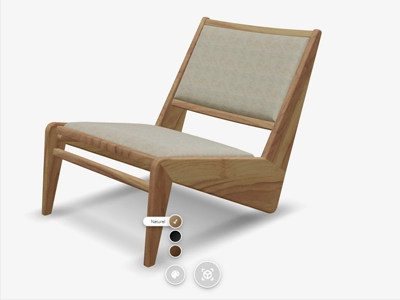
Colours and materials per part
Customers switch colours, materials and textures per product part, visible instantly on the 3D model.

Fully configurable products
Combine variants, options and modules into a configuration that fits the product, whether that's a sofa, a table or a machine.
Interactive hotspots
Point customers to selling points and technical details with clickable hotspots on the product.


Augmented Reality
Customers place their configuration at true scale in their own space, with one tap and no app required.
Simple integration
Add the configurator with one generated HTML snippet, or drive it with our JavaScript API.
One configurator, every industry
The same setup works for furniture, sofas, tables, outdoor kitchens, sanitaryware and machinery alike.
Fewer returns, higher conversion
Customers see exactly what they are ordering, which removes doubt and increases conversion.

One configurator for every product
A 3D product configurator isn’t limited to any single kind of product. The same underlying product configuration works for a table configurator, a sofa configurator, an outdoor kitchen configurator, a bathroom and sanitary configurator or a machine configurator, each with its own shapes, materials and technical options. Whatever the product, customers configure it in 3D and see the result immediately, before they ever place an order.
Configurator types
Four ways to configure a product
Which configurator type fits best depends on the product itself, not the industry it’s sold in. These four types cover most products, from simple to highly complex.
Sidebar configurator
Many separate options in fixed categories, with every choice visible in one overview. Ideal for products such as tables with multiple shape, edge, colour and base options.
Personalization configurator
Puts the focus on the product itself. Customers personalise through hotspots directly on the 3D model, with fewer options than the sidebar.

Modular configurator
For products built up from separate elements, such as sofas or cabinet systems with expandable modules.
Implementation
How a 3D product configurator comes together
Setting one up takes the same steps regardless of the product, from 3D model to a working integration.
1
Supply or have a 3D model designed
Supply an existing 3D model, or have one designed based on a technical drawing, photos, or from scratch.
2
Set up options and groups

In the Vulp dashboard, set up colours, materials, modules and other options per product, however many variants it has.
3
One snippet of code
Add the configurator with a single snippet of code, in a webshop, on a website, or in a showroom app.
4
Choices back in your process

Read out which choices a customer makes through the Vulp API, and connect them to your order process or PIM system.
Built for the industries behind those products
The same configurator already runs in furniture, where sofas and cabinets need colour, material and module choices; in machinery, where technical variants and dimensions matter as much as appearance; and in home and garden, where outdoor kitchens and sanitaryware combine both. Once a product is set up in the Vulp dashboard, it works the same way everywhere: on a webshop product page, a dedicated landing page, or a tablet in a showroom.

Frequently asked questions
How can I integrate the Vulp 3D Configurator into my website or webshop?
Integrating the Vulp 3D Configurator into your website or webshop is very simple. It works much like embedding a YouTube video. You just need to copy the code from our code generator and add it to your platform, whether it's WooCommerce, Shopify, Magento, or others. No coding skills are required.
Learn more: Embed a 3D Viewer With One Line of Code
Is the Vulp 3D Configurator user-friendly for non-technical users?
Yes, the Vulp 3D Configurator is designed to be user-friendly and intuitive. You don't need any technical skills to use it. The interface is straightforward, and extensive documentation and support are available to help you get the most out of the configurator.
Learn more: Documentation, API Reference and Support
What is the Vulp 3D Configurator and how does it work?
The Vulp 3D Configurator is a tool that allows you to personalize your products with realistic 3D visuals. You can customize colors, materials and various options to create a unique product. It integrates seamlessly into any website or webshop and provides a 360-degree view and augmented reality experience without needing to download an app.
Do I need to download an app to use the Vulp 3D Configurator?
No, you don't need to download any app to use the Vulp 3D Configurator. It is a web-based tool that allows you to view and interact with products in 3D directly from your browser. This includes viewing products in Augmented Reality on both iOS and Android devices.
Learn more: Augmented Reality for Webshops, No App Required
What are the main features of the Vulp 3D Configurator?
The main features of the Vulp 3D Configurator include integrability into any website or webshop, 3D animation and interaction, multilingual support, configurable product variations, customizable colors, augmented reality, no app requirement, full customization options, API availability, realistic materials, shadows, and lighting, textual hotspots, and an intuitive user-friendly interface.
Learn more: Features - Learn more about the features of Vulp