










Snippet or API?
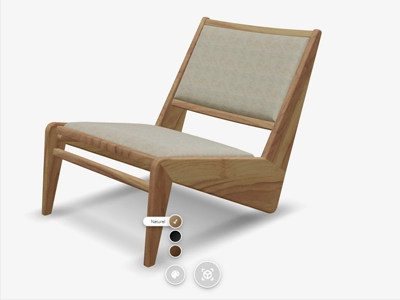
In the dynamic world of online retail, where customer engagement and conversion are crucial, Vulp's 3D product configurator offers a unique opportunity to elevate your web store, whether you have a small assortment or an extensive catalog. The question is: how do you integrate Vulp most effectively into your website or webshop? Here are two approaches:Snippet
Adding Vulp to your webshop is as simple as embedding a YouTube video: copy one snippet of code from our generator and paste it where you want it. It works the same way whether you run Shopify, WooCommerce, Magento, BigCommerce, PrestaShop or a fully custom-built webshop, with no platform-specific plugin to install or maintain.API + Snippet
For webshops with specific requirements or those wanting to offer a fully customized shopping experience, our API is the ideal choice. With the API, you have complete control over how the 3D configurator is integrated and interpreted within your webshop. This is a perfect solution for businesses needing a deeper, more personalized integration.Regardless of your choice, Vulp’s 3D product configurator provides a flexible and powerful tool to enrich your online presence and offer your customers an unforgettable shopping experience.
Any Platform, One Snippet

Works the same way on Shopify, WooCommerce, Magento, BigCommerce, PrestaShop or a fully custom-built webshop. No platform-specific plugin to install or maintain, and your existing product pages, buttons and dropdown menus stay exactly where they are.
Full Control via the API

Drive and read the viewer from your own code: activate Augmented Reality, change colors, read the current configuration, and map the chosen configuration to your own SKU and cart logic.
Try Before You Integrate

See exactly how the snippet and API approach look and feel on a real webshop before you touch any code.
Not sure a 3D configurator is the right fit yet? See why webshops add a 3D product configurator before diving into the integration details above.
Frequently asked questions
How can I integrate the Vulp 3D Configurator into my website or webshop?
Integrating the Vulp 3D Configurator into your website or webshop is very simple. It works much like embedding a YouTube video. You just need to copy the code from our code generator and add it to your platform, whether it's WooCommerce, Shopify, Magento, or others. No coding skills are required.
Learn more: Embed a 3D Viewer With One Line of Code
Does Vulp provide support and assistance for integrating the 3D product configurator?
Yes, our support team is available to assist you with any questions or issues related to integrating and optimizing the 3D product configurator on your webshop.
Learn more: Pricing from €9.99/mo | 3D & AI Content
Can I use Vulp with Shopify or WooCommerce?
Yes, Vulp connects to popular e-commerce platforms including Shopify and WooCommerce with a single code snippet, no dedicated plugin required, making integration into your existing webshop easy.
Learn more: Connect Vulp to Shopify, WooCommerce and Magento
Should I integrate Vulp via a snippet or the API?
It depends on your needs: a code snippet is the quickest way to add a 3D viewer and works the same on any platform, including Shopify or WooCommerce, while the API gives you full control for a fully custom integration.